
Sawgrass Printer Setup Simplified: Your Step-by-Step Starter Hub
Congratulations on your new Sawgrass printer! Whether you're setting up the SG500, SG1000, this page brings together every essential resource to get you printing fast, with no guesswork. From unboxing and connecting to that satisfying first print, we've got you covered.
Unbox, install, connect, and print, without missing a step.
Unboxing & Preparing Your Workspace
Blog Resource: Unboxing and Placement Tips for Your Sawgrass Printer
- Choose a clean, dry, well-ventilated space
- Avoid heat sources and direct sunlight
- Leave clearance on all sides for proper airflow
- Save all packaging for future transport/technical needs
Pro Tip: Don’t skip removing the internal foam block within the printer—it can trigger service errors!
Optional Trays: Should You Attach One?
Blog Resource: Do You Need the Bypass or Option Tray? A Quick Setup Guide
- When and why to use the Bypass Tray
- Step-by-step on connecting trays safely
- Power connection location and cable placement
Ink Cartridge Installation
Blog Resource: First-Time Ink Setup: Choosing and Installing Your Cartridges
- Important: Once you load sublimation ink, and the set you have decided to work
with (Sublijet UHD, VersiFlex, EasySubli, ChromaBlast) that’s it—your printer is locked to that ink type - Install in this order: Black → Cyan → Magenta → Yellow
- Initial ink charge takes 7–13 minutes
Pro Tip: Ink levels won’t show 100% after setup—that’s normal! The ink has filled the lines within the printer, so the level of ink will read between half to three-fourths full.
Connectivity: USB, Wi-Fi, or Ethernet?
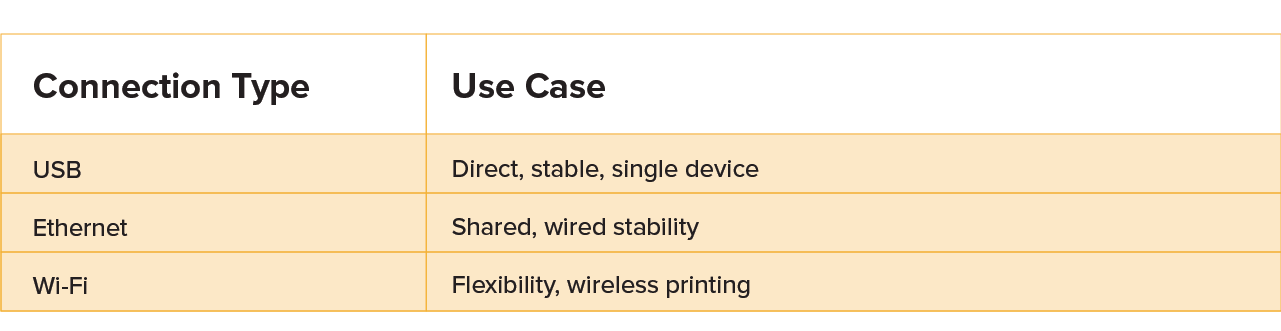
Pro Tip: For USB, plug in the cable only when prompted during driver installation
Ink Cartridge Installation
Essential Tool: Sawgrass Print Utility
• Controls color management
• Manages job queues and media settings
• Works with Sawgrass Design tool and other design software (Photoshop, Illustrator, CorelDraw)
Ink Cartridge Installation
Windows & macOS Install & Get Started Video
See every step from box to first print, including the tricky parts most people miss.
Need Help?
Still stuck?
Reach out to our Sawgrass Care Team, or tap the Help button on the bottom right of the page for live support.