
Sublimation FAQ
Looking for Product Instructions? Templates?
Product instructions and product templates will be located on the product page of the SKU purchased. Instructions can be found under the "Product Instructions" tab, and templates can be found under "Downloads".

1. What Is Sublimation Printing?
Sublimation printing is a process that uses heat (around 350–400°F) to turn ink into gas, allowing it to permanently bond with polyester fabrics or coated surfaces. The result is a smooth, vibrant print that won’t crack, peel, or wash off.
2. What Is Sublimation Ink?
Sublimation ink is a special heat-activated ink that turns into gas under high temperatures (around 350–400°F) and embeds directly into materials, creating long-lasting, professional-quality prints.
3. What Do You Need to Make Sublimation Shirts?
To get started, you need 5 essential items:
- Sublimation printer
- Sublimation ink
- Sublimation paper
- Heat press machine
- 100% polyester shirt (preferably white or light-colored)
4. Do You Need a Heat Press for Sublimation?
Yes — a heat press is 100% necessary. It provides consistent heat and pressure, which is critical for proper ink transfer.
5. Can You Use an Iron for Sublimation?
Technically yes, but it is not recommended. An iron cannot maintain even heat or pressure, leading to faded or patchy results.
6. What Kind of Shirt Is Best for Sublimation?
- 100% polyester shirts
- Light-colored fabrics (white works best)
- Blends with at least 65% polyester (may appear slightly faded)
7. Can You Sublimate on Polyester?
Yes — sublimation works best on polyester. Higher polyester content gives more vibrant and durable results.
8. Can You Sublimate on Cotton?
No — standard sublimation does not work on cotton. Special coatings or alternative methods are required.
9. Can You Sublimate on Dark Fabric?
No — sublimation ink is transparent and only works on light-colored surfaces.
10. What Fabric Is Used for Sublimation Printing?
- Polyester fabrics
- Polymer-coated materials
Natural fabrics like cotton or wool are not suitable without special treatment.
11. What Is a Sublimation Blank?
A sublimation blank is a product designed for sublimation printing, made from polyester or coated with a special layer.
- T-shirts
- Mugs
- Tumblers
- Keychains
12. What Can You Sublimate?
- Apparel (shirts, hoodies)
- Drinkware (mugs, tumblers)
- Home decor (coasters, photo panels)
- Accessories (phone cases, keychains)
13. How Do You Use Sublimation Paper?
- Print your design (mirror image)
- Place it on your blank
- Press with heat (follow instructions)
- Remove paper and allow to cool
14. Does Sublimation Paper Work with Any Inkjet Printer?
No — it only works with printers using sublimation ink.
15. How Long Does Sublimation Ink Last?
- Unopened: 1–2 years
- Opened: 6–12 months
16. How Long Does a Sublimation Print Last?
Sublimation prints can last for years, often the life of the garment, without cracking or fading.
17. Why Do Sublimation Prints Look Dull?
- Low temperature
- Insufficient pressing time
- Low-quality ink
- Wrong material (e.g., cotton)
18. What Temperature Is Used for Sublimation?
- Temperature: 350–400°F
- Pressure: Medium
- Time: Depends on the blank
19. How Long Do You Press Sublimation on Polyester?
- Time: 45–60 seconds
- Temperature: ~385–400°F
20. Do You Use a Heat Press for Sublimation?
Yes — a heat press ensures consistent, professional-quality results.
21. What Is the Difference Between DTF, DTG, and Sublimation?
- Sublimation: Best for polyester, long-lasting
- DTG: Best for cotton, soft feel
- DTF: Works on most fabrics, highly versatile
22. Can You Sublimate on Acrylic?
Yes — but only if it has a sublimation coating.
23. Can You Sublimate on Flannel?
No — flannel is typically cotton-based and not suitable.
24. Can You Use Parchment Paper for Sublimation?
Yes — it protects your heat press and prevents ink transfer to the machine.
25. What Is a Sublimation Printer?
A printer designed to use sublimation ink instead of standard ink.
- Epson printers (small & wide format)
- Sawgrass sublimation printers
26. What Is Needed for Sublimation Printing?
- Sublimation printer
- Sublimation ink
- Sublimation paper
- Heat press
- Polyester or coated blanks
27. What Are Sublimation Blanks?
Products specifically made to accept sublimation ink and produce permanent results.
28. What Conditions Are Required for Sublimation?
- High heat (~350–400°F)
- Firm pressure
- Polyester or coated surface
What Do I Need to Start A Sublimation Business?
Starting a sublimation business is one of the easiest and most economical start-ups in the digital decorating industry.
- Sublimation compatible printer - You must have a dedicated sublimation printer that is compatible with the available cartridges. Currently, these include Sawgrass & Epson small format printers and a wide variety of large format printers such as, Epson, Mimaki & Mutoh.
- Sublimation inks - Sublimation inks aren't quite the same as standard inkjet ink - they are available in the usual cartridge form, or in some cases, bulk ink liters. Sublimation ink must be heat activated for the colors to fully brighten and transfer into the item due to the chemical make-up of the ink. Because it is different from standard inkjet ink, you must use a specialized printer driver, software, or color profile embedded within the document for correct output. This is something that the manufacturer of the ink can develop and provide, which is why it is important to buy dye-sublimation ink from a quality supplier.
- Sublimation paper - Sublimation paper is necessary for the ink to transfer onto the substrates; it is designed to release as much of the printed image as possible from the sheet, when heated and transferring to a polyester coated item, or polyester fabric.
- Heat press or silicone press wraps - Since sublimation requires such a high level of temperature and pressure, you must use either a heat press to press the item or a silicone wrap within a conventional oven to press the item. A commercial heat press will be the most efficient way of sublimating most of our items, but some items with a unique shape such as the pet bowls and shot glasses must be sublimated using a wrap in a conventional oven.
- Color correction software or color profile - Since sublimation ink is not the same as the intended inkjet ink for the printers it often runs through some form of correction for the color differences that are needed. Most printers that are made for Sublimation offer this type of color correction program/driver.
- Sublimation blanks - Sublimation blanks are items that are specifically coated to receive sublimation ink. With sublimation you can transfer onto 100% white polyester fabric or fabric-topped items, as well as poly coated hard surfaces. You cannot sublimate onto cotton or dark fabrics -- colored garments can be sublimated onto but bear in mind that since the ink is slightly transparent, your transfer/image will take on the shade of the shirt color below it, and may result in a poor result. There are sprays on the market designed for home users to coat their own items to be sublimated upon, but in our testing, we have not found the results to be consistent in coverage or durability.
Why are my Transfers Browning?
If your transfers are browning, then this is an issue with Over-pressing.
Over-pressing can be caused by a couple of factors that will be detailed below.
- Time: One of the most occurrences of over-pressing is too much time. Double check the time we suggest for that item.
- Pressure: Too much pressure can place a lot of heat on to the surface of the item and cause it to scorch. If time and temperature are correct, try and reduce the pressure.
- Temperature: If the temperature of the press is off and running hotter than it is currently reading then it will cause browning. To double check this we suggest using heat test strips to get a better idea as to what your platen is actually heating to.
Why are my Transfers Coming Out Blurry?
When pressing sublimation blanks, one of the most common issues is blurry results. Blurriness can manifest itself in two different ways: in the form of a duplicate image also called "ghosting" which looks a lot like seeing double or an image that has reduced detail.
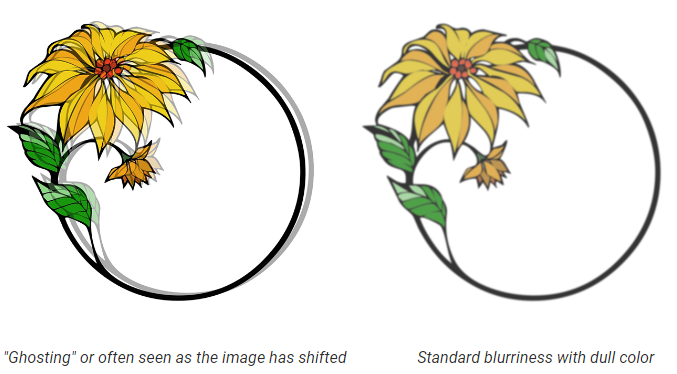
Ghosting
During the pressing process, an image may shift position on the substrate causing the sublimation ink to continue imprinting but in a different spot. This most often occurs when the heat press machine is opened and the top platen picks up, or accidentally moves, the printed image on the sublimation paper while the sublimation process is still going on. This is avoided easily by taping down the design securely onto your substrate with heat transfer tape so that it doesn't shift at any point. For some items like polyester apparel, a spray adhesive may be a better solution as tape doesn't stick to it easily.
Remember that if the substrate is still hot, the sublimation ink from the paper will continue to activate. If you pre-press your sublimation blanks, ensure that they are cool to the touch before lining up your printed transfer for pressing.
Blurry, Dull Image
The second reason why your image might be coming out blurry, especially if there is a loss of detail and a change in color (looking yellow or dull), is over-pressing. Over-pressing can be caused either due to too much heat or too much time. A blurry, dull image is the most common sign of pressing your sublimation blanks for too long or with too much heat. Simply decreasing the time usually resolves the problem.