
Best T-Shirt Printing Paper for Small Shops
Selling Custom Shirts Online? Here’s the Best Heat Transfer Paper for Small Shops
Not all T-shirt transfer papers are created equal, and using the wrong one could cost you quality, money, and even customers.
Google Trends shows a 25% rise in searches for “printable heat transfer paper” since 2023. Over 40% of small apparel sellers now use laser-compatible t shirt printing paper for faster results. And with technology evolving for performance fabrics and dark colors, small shops have more options than ever.
Why Your T-Shirt Printing Paper Actually Matters
The t-shirt printing paper you choose directly impacts:
- Print clarity (how sharp your designs look)
- Fabric compatibility (cotton, polyester, blends)
- Durability (how long prints last after washing)
- Customer satisfaction
For beginners or small shop owners, the right paper is the foundation of a pro-looking shirt. Whether you’re making a single hoodie for a client or printing 100 tees for an event, your choice of printable heat transfer paper determines if you get rave reviews or refunds.
Understanding the Different Types of Heat Transfer Paper
Inkjet Heat Transfer Paper for Shirts
Ideal for white or dark cotton shirts and vibrant, full-color designs. Works well for small-batch printing and custom orders. Requires proper wash care for best longevity.
See our Inkjet Heat Transfer Paper options.
Laser Printer Transfer Sheets for Shirts
Toner-based for crisp lines and durability. Perfect for high-volume printing and small businesses that value speed.
Browse Laser Printer Transfer Paper.
Sublimation Transfer Paper – Highest Durability, Vibrant transfers
With the use of Sublimation ink, and white or light-colored polyester garments print durable and vibrant transfers that will stand out against other transfer processes.
This process is great for performance wear, where stretchability and durability are key.
How to Choose the Best Heat Transfer Paper for Your Fabric
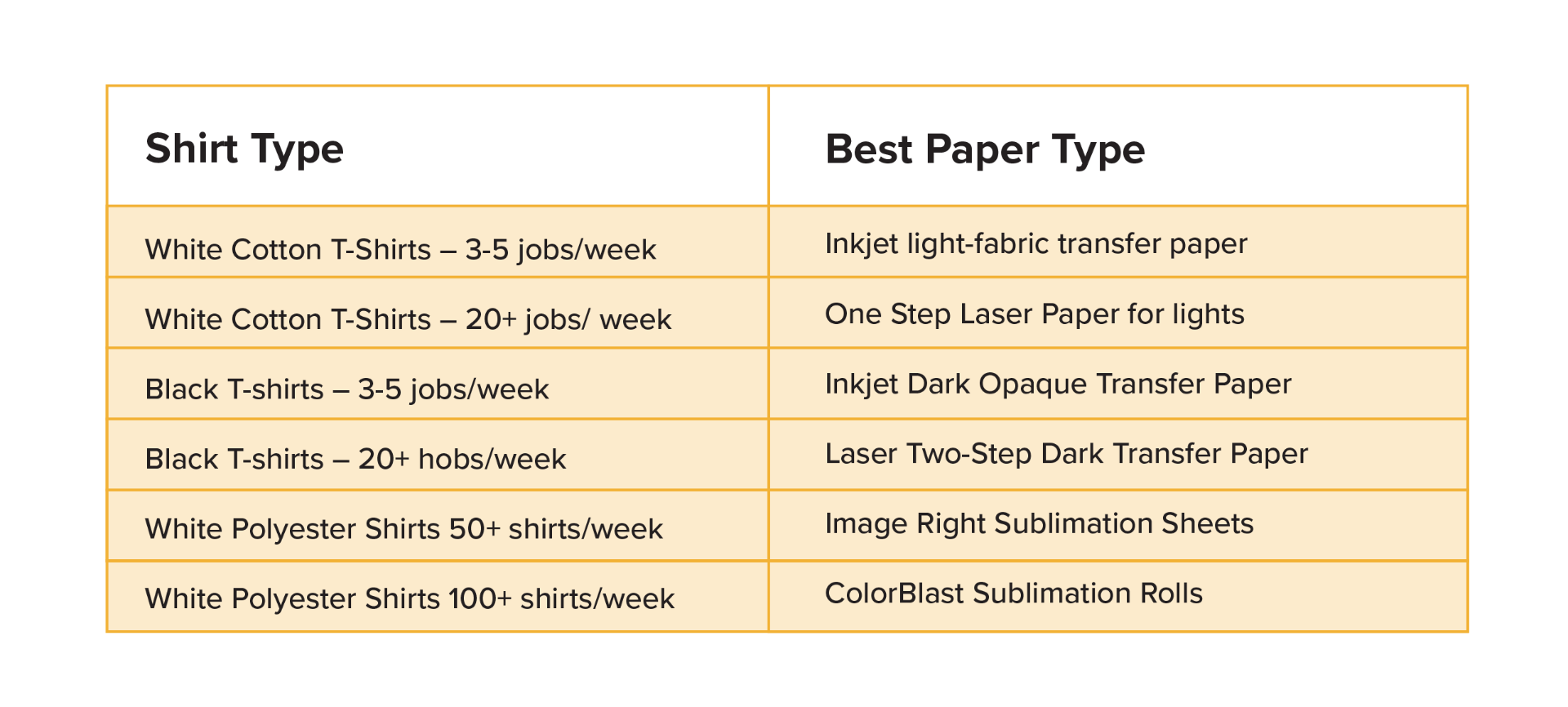
Ask yourself: What fabrics am I printing on? What colors? How many prints per week?
Print-Ready in Minutes: Step-by-Step Transfer Guide
Prepare Your Design for Printing
- Mirror (For most heat transfers)
- Add bleed areas for full coverage
- Check color settings
Print It Right: Inkjet vs Laser vs Sublimation Settings
- Inkjet: Use photo or best-quality mode
- Laser: Match paper type in settings
- Sublimation: Print profile settings, like Sawgrass Print Utility
Use Your Heat Press Like a Pro – Home Iron Not Recommended
- Follow paper-specific time, temperature, and pressure settings
- Hot peel or cold peel as recommended
Finishing Touches: Let It Cool & Last
- Optional: Post-press for 5–10 seconds for durability
- Wash inside out, cold water, gentle cycle, no fabric softener
Coastal Recommendations for Small Shops
- Neenah Jet-Pro Soft Stretch Inkjet Transfer Paper – great for light fabrics
- Forever Laser-Dark Transfer Paper – perfect for dark cotton or blends
- Siser EasySubli Heat Transfer Paper – ideal for sublimation on cotton
- Image Right Sublimation Paper – perfect for white or light-colored polyester
All available in 8.5×11″ or 11×17″ sheets with fast U.S. shipping from multiple warehouse locations.
Smart Buying Tips: Save Money & Get Better Prints
- Test small sample packs before committing
- Buy in bulk to reduce per-sheet cost
- Always match paper type to printer & heat source
- Store in a cool, dry place for best results
Quick Checklist Before You Start Printing
- Correct transfer paper type
- Printer compatibility (inkjet, laser or Sublimation)
- Heat press
- Fabric type (light, dark, poly, blends)
Conclusion
Choosing the right T-shirt printing paper doesn’t have to be overwhelming. Match your paper to your printer and shirt type, and you’ll be producing professional-quality designs from your home studio or small shop in no time.
FAQs
1. What is the difference between inkjet heat transfer paper for light and dark shirts?
Answer: Light paper is transparent and works best on white or pastel fabrics; dark paper has a white opaque base for bold colors.
2. Can you use inkjet or laser heat transfer paper on polyester?
Answer: Yes, choose a stretchable transfer paper such as Jetro Soft Stretch or sublimation-compatible transfer sheets.
3. How do I know if my printer supports t-shirt transfer sheets?
Answer: Check your printer manual; most inkjets and many laser printers are compatible. To print onto dark colored fabrics with the laser process, it is highly recommended to have white toner printer, such as the Crio Powderless DTF+ system.
4. Does heat transfer paper, work with regular iron?
Answer: In most cases, no. Consistent heat and pressure are key with transfer papers. It is very common to have issues in the peeling process of transfer.
5, How long do transfer prints last after washing?
Answer: With proper care, many last 25–30 washes or more, depending on the process. Inkjet is around 25-3c0; laser can be up to 60+, while Sublimation lasts forever.



0 Comments
Leave a Comment